


SnowBall
-
Posts
7,629 -
Joined
-
Last visited
-
Days Won
80
Everything posted by SnowBall
-
Have you checked out our new COD BO7 Optimus yet?
It comes packed with some seriously strong features, especially the aimbot prediction. You’ll be hitting those long-range shots that feel amazing… and they’ll never see it coming.
Ready to try it for yourself?
Check the product out here: -
Did you know you can now earn money with us?
Once you reach $250 in store credit, we’ll pay you out in USDT.
Check the full details here:
-
Thinking of dropping a few Apex Legends games, but not sure if I should go with Maxim for basic functions and safety, or go with Brix and rage hack the whole lobby into oblivion 😄
What’s your choice?
https://battlelog.co/apex-legends-hacks-cheats-aimbot-esp-radar/ -
Last 4 days have been crazy with WARDOGS game, nearly half a million steam players!!
Jump in and dominate everyone with our undetected, world leading software!! ❤️
Get started here:
https://battlelog.co/store/category/73-wardogs/ -
Many people assume our software is unsafe. In reality, none of our products can hold a valid Windows license for obvious reasons. As a result, Windows automatically flags them as potential threats even though they are not.
-
I'm sorry we ware unable to solve the issue, this is rare for us but it does happen, at this point we are happy to offer you a free swap to any other product, a store credit or ofc if you want a full refund on your purcahse ❤️
-
Sorry for the confusion, developer messed up loaders and updates so support was a bit lost, at the later stage of your troubleshooting dev provided new loader that fixes the issue and that's why it worked, Ben was only at the right place at the right time but I'm happy we made it work for you and that you are having fun now ❤️
-
Do not feel shamed to ask for help that's why we are here, always online 24/7 to make sure you are always taken care of ❤️
-
Thank you for always coming to us, we will always be here and ready to assist ❤️
-
I'm happy to see you apprichiate all the effort we put in our support, it means a lot to us. As we ware unable to sort your problem feel free to ask full swap to another product for free, store credit or even a refund as we always make sure you as customer have a solution that works for you ❤️
-
I'm sorry we ware not able to fix the issue for you, in this case you are entitles for free swap or full refund as we will always protect our customers ❤️
-
I'm sorry we ware unable to fix the problem for you, and I hope we ware able to find a solution for you that made you happy ether being a free swap to any other product of your choosing or refund to your bank account ❤️
-
In case you ware unable to use services you paid for due to our software fault please come back to live chat support so I can give you refund or free swap to any other project you want ❤️
-
I'm sorry we weren't able to make the software work for you. It's a rare occasion that the software is not compatible with someone's specific hardware. If we've completed all troubleshooting and are still unable to fix the issue, we are more than happy to offer a free swap to another project or a full refund to protect you as our customer. ❤️
-

Works but be careful, and no refund for services I did not use though.
SnowBall replied to dshooter26's topic in Reviews
Please come back to live chat support and we will offer a refund just let them know it is approved by Frost. We want you to be as happy as possible for using our services ❤️ -
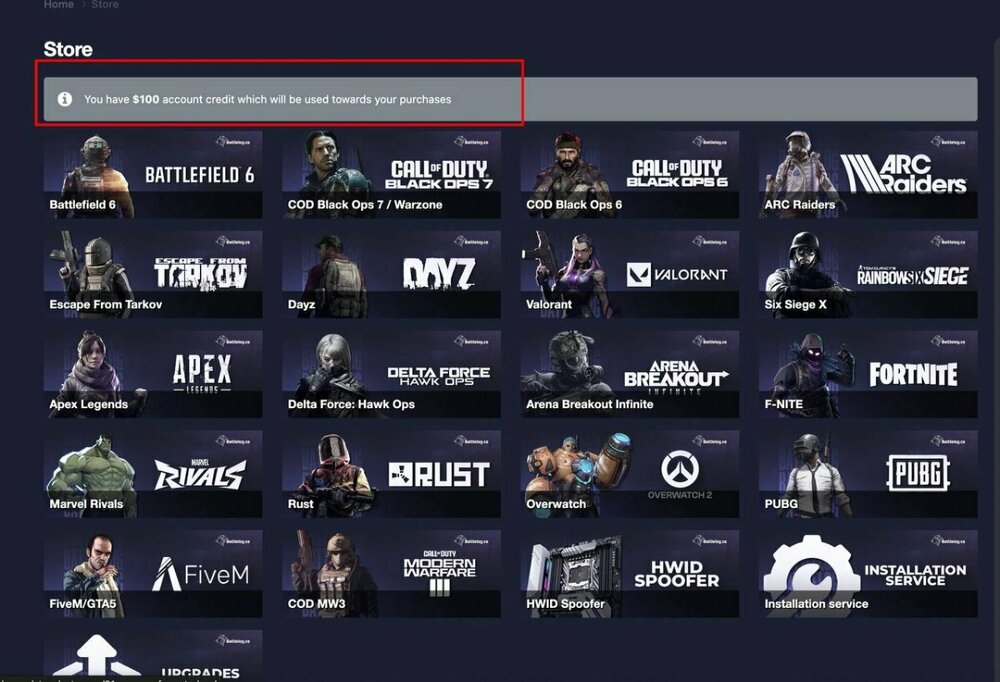
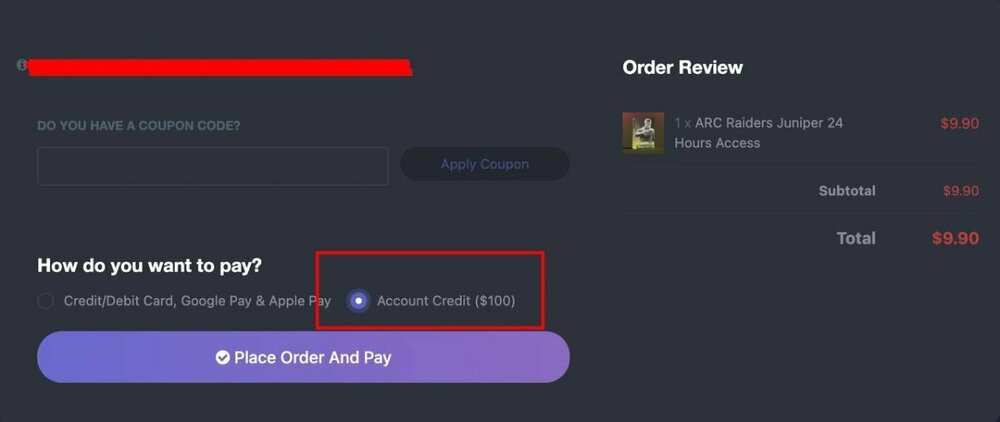
Hey everyone! 👋 A lot of you have been asking how to actually use the store credit you received (rewards, refunds, promotions, etc.). It’s super easy – here’s exactly how it works: 1. Check your available credit When you visit the Store page, you’ll now see a banner right at the top that shows your current store credit balance. (Example in the first screenshot below – it says “You have $100 account credit which will be used towards your purchases”) 2. Add anything to your cart Pick whatever service or package you want (24-hour access, upgrades, etc.) and proceed to checkout as usual. 3. Choose “Account Credit” as payment method On the checkout page, under “How do you want to pay?”, you’ll see the option Account Credit ($XX.XX). Just select it and the exact amount of your available credit will be automatically applied (see second screenshot). If your credit covers the full amount → total drops to $0 and you’re good to go! If the order is more expensive than your credit → the remaining balance can be paid with card, Google Pay, Apple Pay, etc. Screenshots for reference: [Image 1 – Store page showing $100 credit banner at the top] [Image 2 – Checkout page with “Account Credit ($100)” selected] That’s it! No coupon codes needed, no extra steps – the credit is applied automatically once you select it. If the banner doesn’t appear or the credit option is missing, just drop us a quick message. Happy shopping and see you in-game! 🔥
-
- 1
-

-
Thank for your feedback! Unfortunetly it's agains Discord TOS to have servers in sectors like ours, but support is online 24/7 over our chat system and you can reach to anyone in under 60 seconds ❤️
-
Battlefield 6 Beta Week 2 is now online!
Enjoy dominating the lobby with out Phoenix software! ❤️ -
Thank you for your feedback, and suggestion we will look into this and see what is possible to further improve your experaince. Our live chat support is online 24/7 and if any questions about functions / setup is needed we will be more then happy to help you answer them ❤️
-
Your key time starts once you've entered the key in loader yourself, and continues running until the validity period expires, regardless of whether you actively use it or not.
-
Absolutely! We offer a personal setup installation service that takes care of everything for you via remote control. You can check it on our store page here: Be sure to read the service rules before purchasing.
-
Most of our hack support hotkey customization. You can check the store page for details or reach out to our 24/7 live chat support for assistance.
-
Go to the Battlelog Homepage to see an overview of our products offered.